Chat Widget now includes built-in spam protection to help prevent bot and high-volume suspicious submissions from impacting your messaging costs and sender reputation.
Spam protection works automatically in the background without adding CAPTCHA, extra form fields, or additional steps for genuine visitors.
Instead of deleting suspicious submissions, the platform keeps the contact, tags it for review, and can pause SMS, email, or both based on your selected setting. This ensures potentially legitimate leads are not lost while preventing unnecessary outbound messages to suspicious contacts.
What's New
Automatic spam protection without visitor friction
Spam and suspicious submissions are detected automatically without changing the visitor experience.
There is:
* No CAPTCHA
* No additional form fields
* No extra loading or verification step
* No change to the experience for genuine visitors
Suspicious leads are kept for review
Flagged contacts are not deleted.
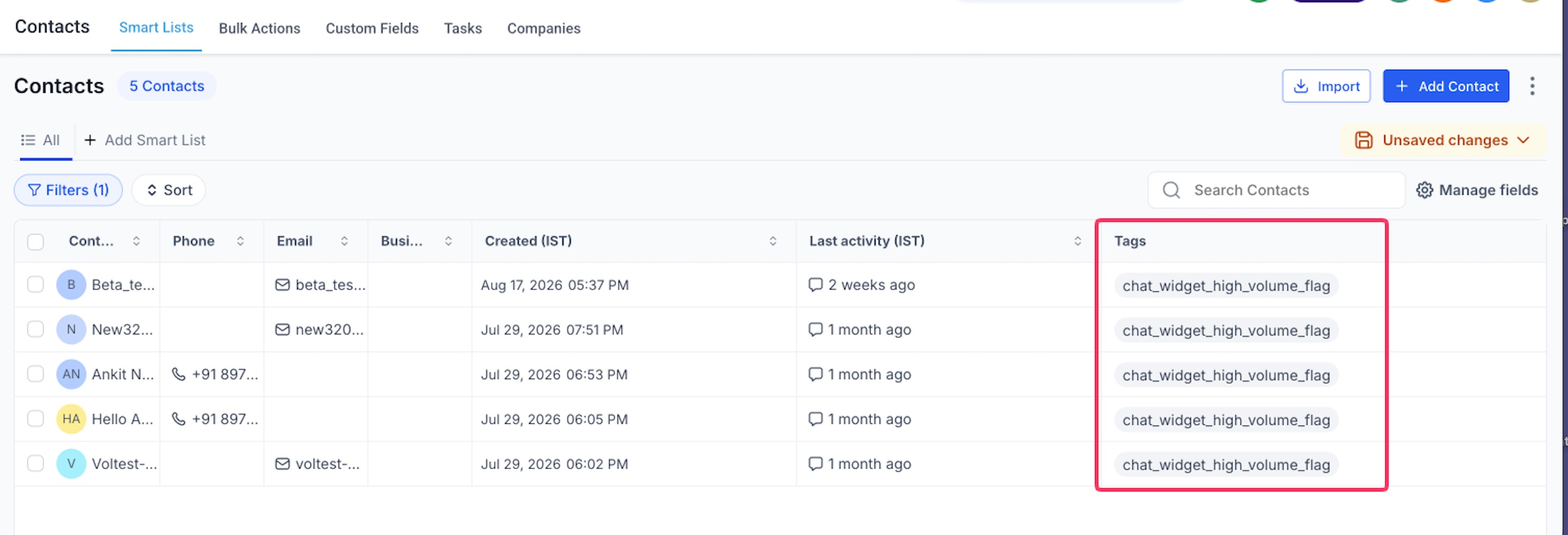
They are created normally and tagged with:
chat_widget_high_volume_flag
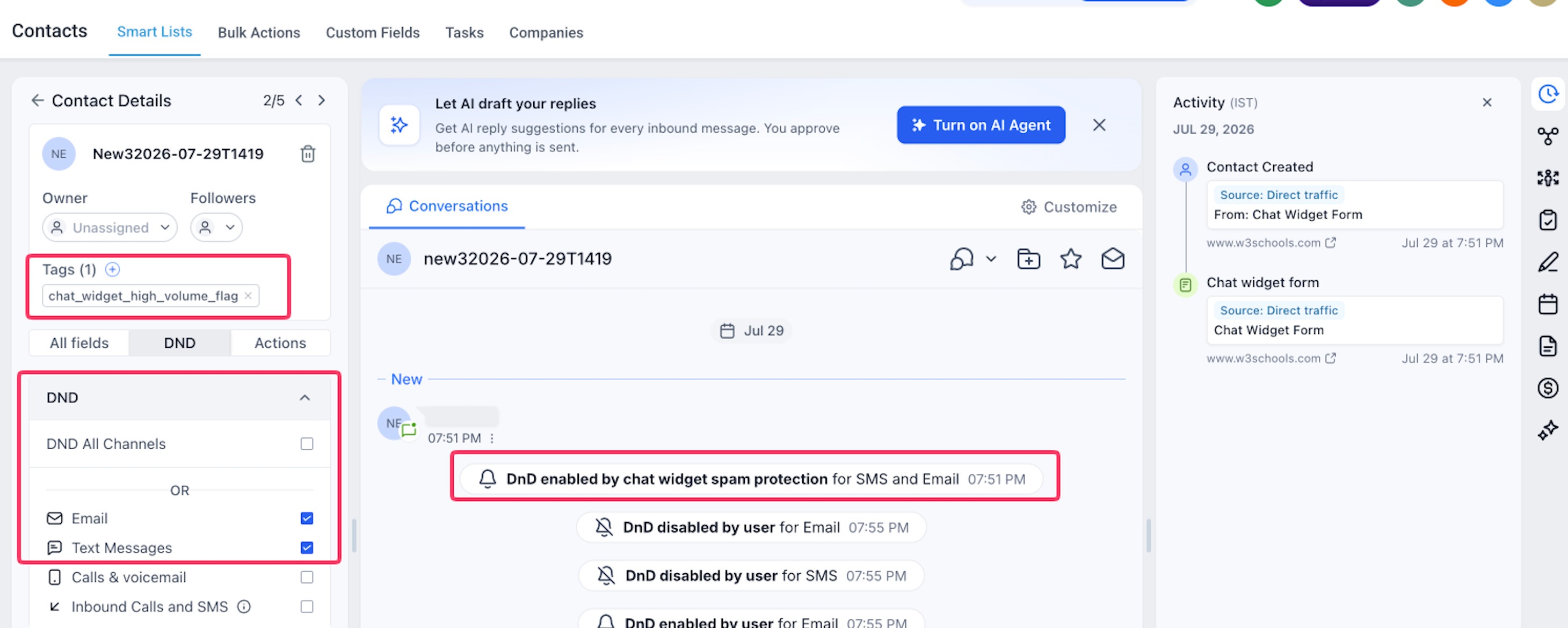
Depending on your configuration, SMS, email, or both can be paused for that contact. This allows your team to review suspicious leads and restore messaging when the submission is legitimate.
Protect your sender reputation
Sending messages to invalid phone numbers and email addresses can generate unnecessary costs, bounces, and delivery issues.
Spam Protection prevents outbound messaging on the selected channels for flagged contacts, helping reduce unnecessary messaging spend and protect SMS and email sender reputation.
Configure protection independently for each widget
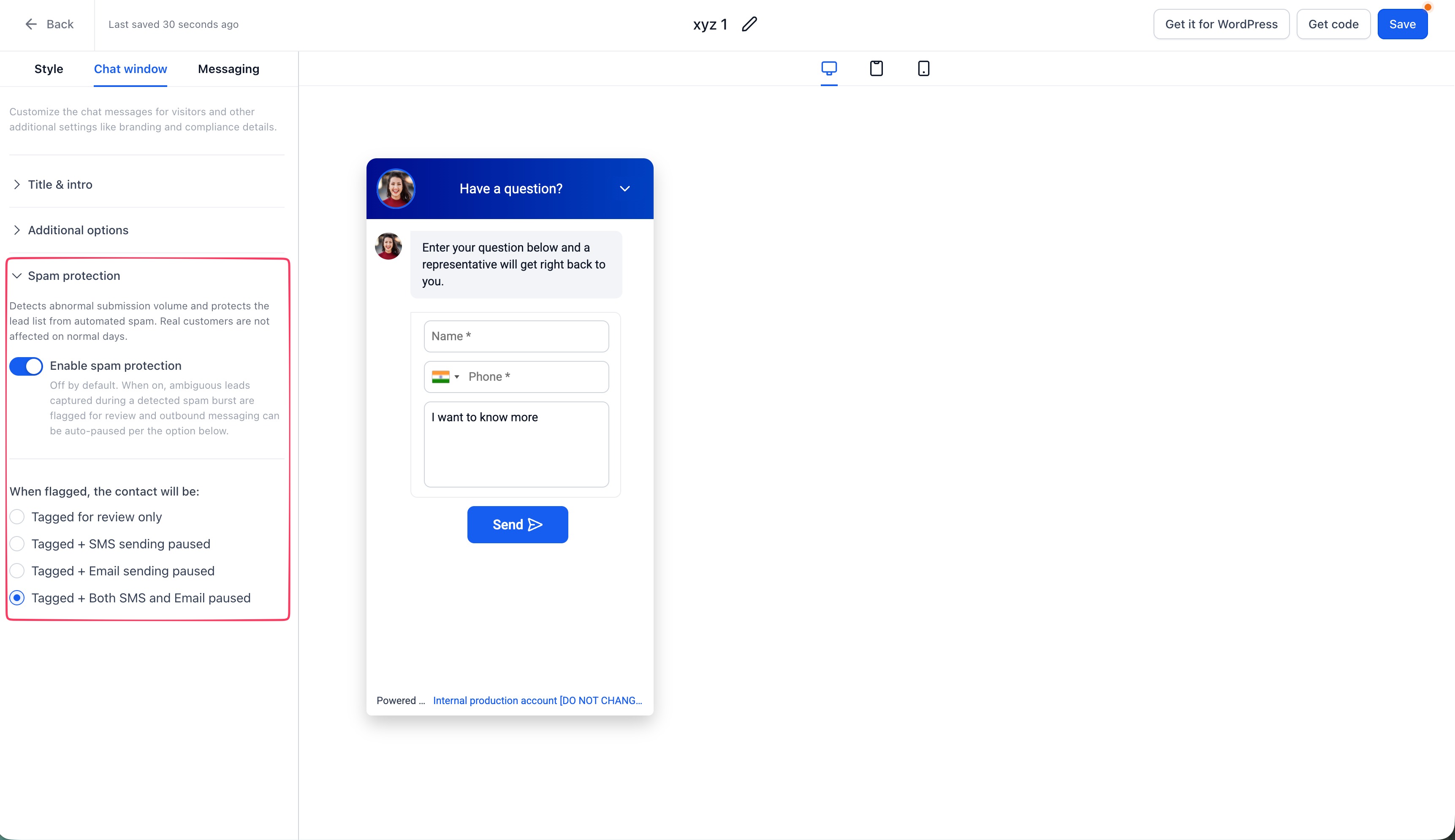
Spam Protection is configured at the individual Chat Widget level.
You can choose from four actions:
* Tag Only
* Pause SMS
* Pause Email
* Pause Both
Only the selected channel is affected. Other communication channels and existing DND preferences remain unchanged.
Clear activity history
When messaging is paused by Spam Protection, the contact activity log records the action and identifies the affected channel.
Flagged contacts can also be found by filtering for the
chat_widget_high_volume_flag
tag.Safe defaults for existing and new widgets
For existing Chat Widgets, Spam Protection is OFF by default so current behavior does not change unexpectedly.
For newly created Chat Widgets, Spam Protection is ON by default with
Pause Both
selected.## How to Enable Spam Protection
- Go to Sites > Chat Widget.
- Open the Chat Widget you want to configure.
- Open Spam Protectionin the builder sidebar.
- Turn Spam Protection on.
- Select the action to take when a suspicious submission is detected.
- Save your changes.
To review flagged contacts later, filter your contacts using the
chat_widget_high_volume_flag
tag.If you're expecting an unusually large legitimate traffic spike, such as during a major campaign, launch, event, or press announcement, you can temporarily disable Spam Protection for that widget and enable it again afterward.
Why We Built This
A spam attack against a Chat Widget can create hundreds of fake contacts within a short period of time. If automated follow-ups are triggered for those contacts, businesses can end up sending SMS and emails to invalid destinations.
Beyond the unnecessary messaging cost, repeated failures and bounces can negatively affect sender reputation and the deliverability of legitimate campaigns.
Chat Widget Spam Protection helps prevent this automatically while keeping suspicious contacts available for review rather than permanently discarding them.
For security reasons, the specific signals and thresholds used to identify suspicious activity are not published. This helps prevent malicious actors from designing submissions specifically to bypass the protection.
What's Next
We will continue improving Spam Protection with:
* Broader protection coverage
* Better visibility into flagged contacts
* Additional review and management controls
* Ongoing detection improvements based on real-world traffic
Was this article helpful?
That’s Great!
Thank you for your feedback
Sorry! We couldn't be helpful
Thank you for your feedback
Feedback sent
We appreciate your effort and will try to fix the article